

Pinterest should be one of the easiest platforms for bloggers to use.
You already have the article. You already did the research, found the angle, wrote the headline, built the page, and published da*mn the thing.
Yet somehow, turning that finished post into Pinterest content can still eat an entire afternoon.
That was the part I wanted to fix.
A lot of creators either skip Pinterest completely or make one pin, post it once, and move on.
Meanwhile, the blog they spent hours writing is sitting there with way more material inside it than one graphic could ever use.
So I built a system around that.
I call it the Pin Multiplier.
One blog post can become up to seven Pinterest pins, each with its own search angle, copy, destination board, and design treatment. Those pins are built from my existing templates, dropped into a publishing queue, and can carry affiliate product tags alongside the link back to the article.
The goal is simple: make the content I already worked hard on travel farther.
How I turn one blog post into seven Pinterest pins
The biggest shift was realizing I did not need more content for Pinterest.
It’s all literally already there…
A single blog post usually contains several ideas people might search for separately.
An article about running a solo business with AI, for example, could speak to someone searching for AI workflows, content automation, solo business systems, productivity tools, or ways to manage marketing alone.Those people may all end up reading the same article,
but they probably will not arrive through the same search phrase.
That is where the multiplier starts.
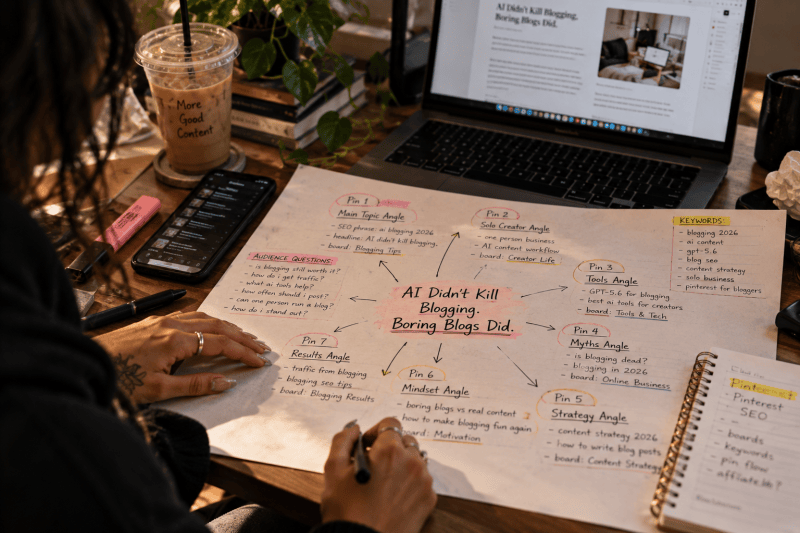
The system reads the post and looks for up to seven distinct Pinterest angles.
Each one gets its own search phrase, headline, title, description, and board assignment.
I am essentially giving one article several different front doors instead of expecting one pin to explain the whole thing.
Pinterest behaves more like a search engine than a traditional social feed, I said what I said.
People arrive with intent.
They are looking for an idea, a solution, a product, a tutorial,
something to save, or something they want to come back to later.
My audience fits that behavior almost perfectly.
A lot of the people I write for are women between 18 and 34, creators who live on their phones and save everything they might need later. Pinterest already matches how they collect information.
I just needed a better way to keep showing up there.
My Pinterest SEO strategy starts with the article
I have spent more than a year working on monasmedia.com, paying attention to what actually moves people from a search result, post, or platform onto the site. The biggest lesson has been that distribution works better when I stop treating every platform like it needs a completely separate content machine.
The article already contains the strategy.
The Pinterest system reads what is there and pulls out the strongest searchable angles. One pin might focus on the main topic, another on a supporting idea buried halfway through the post, and another on a tool, process, or question that deserves its own entry point.
That gives me more surface area without sending me back to a blank page.
I learned a version of this long before building the Pin Multiplier.
I grew a brand’s Instagram from 5,000 to 11,000 followers with zero ad spend, entirely through organic content. That experience taught me how much a strong idea can keep working when you package it in ways that meet people where they already are.
Pinterest simply gives that idea a much longer shelf life.

I built the pins from my own Pinterest templates
Once the angles are chosen, the next problem is visual consistency.
Automation gets messy very quickly when every output starts from scratch,
so I gave the system templates instead of asking it to invent a new design every time.
Those templates already contain the visual decisions I care about, including spacing, typography, image placement, hierarchy, and the general look of Mona’s Media.
The system fills the template. It does not reinvent the brand.
That distinction saves me a ridiculous amount of time.
I still get variation across the seven pins because the headline, image, angle, and emphasis can change, but everything comes from the same visual family. I can look at the batch and immediately recognize it as mine.
That is how I like to use AI in general. I make the taste decisions once,
then I build systems that can repeat them.
I am a top 1% ChatGPT user, and that is a huge part of how I run Mona’s Media as a solo operator.
I use AI workflows to cover work that would normally be divided between writers, designers, strategists, researchers, and operations people. The value comes from deciding which parts actually need my judgment and which parts can follow a process I already defined.
Pinterest production landed firmly in the second category.
My Pinterest pins go straight into a scheduling queue
The part that finally made the system useful was connecting the finished pins to an actual publishing queue.
Before that, I could create a batch of graphics quickly and still end up with a folder full of things I meant to post later. Which is basically digital clutter wearing a cute outfit.
Now the finished pins have somewhere to go.
The system schedules them into the queue so one article can keep resurfacing over time instead of getting one burst of attention on publish day. Each pin has a different search angle and a different chance of being discovered, which means the blog has several opportunities to find the right reader.
That is the kind of content system I want more of.
I publish the core idea once.
The distribution keeps working after I have moved on to the next project.
As a solo business owner, that simplicity is golden.
I can be writing another blog post, editing video, working with a client, building a product,
or doing literally anything else while older content is still creating new entry points back to my site.
I added affiliate product tags to the pins too
Then I realized the pin could do one more job.
Pinterest allows product tagging, soooooooo…
I built an affiliate layer into the system.
A pin can link back to the blog post while also carrying a relevant shoppable product tag.
Babe, that means the article still gets the click, while the product has its own path to purchase.
I love this setup because it fits naturally into the content I already make.
If I am writing about a creator setup, a workflow, a desk tool, a camera accessory,
or a product I genuinely use as part of the topic, the reader can explore the article and shop the item from the same piece of Pinterest content.
The pin becomes more useful without turning the blog into a giant sales page.
It also gives one piece of content several ways to create value.
The article can earn traffic, the pin can show up in search, the product can earn affiliate revenue,
and the site gets another chance to meet someone new.
That is a much better return on one afternoon of writing.

Steal this Pinterest content multiplier prompt
The simplest version of this system is easy to reuse.
I run it in Muse, my AI assistant, and the whole thing is one command.
Give Muse this command:
Multiply this post: [paste your blog URL]
Then hand it two things: your Pinterest templates and your board list.
Ask it to pull several distinct search angles from the article and create a unique search phrase, headline, title, description, and board recommendation for each one.
That is the core of the system.
New to Muse? Join at muse.ai/join and redeem my code C22PQJ in Settings within 48 hours.
We both get 1 billion Muse tokens to play with.
CHA-CHING BABY!
You can build the scheduling and affiliate pieces later if you want to go deeper.
Even the basic version gives a finished blog post several chances to travel instead of relying on one pin and one headline.
I built the larger workflow because repetitive content production is exactly the kind of thing I like turning into a system.If I catch myself doing the same manual task over and over,
I usually start looking for the reusable rule underneath it.
The Pin Multiplier came from that instinct.
The bigger system behind it
The Pin Multiplier is one piece of how I think about organic growth as a solo creator.
I want my website, content, search traffic, products, and distribution channels working together instead of behaving like separate jobs I have to keep feeding.
Want the full workshop version? I turned this system into two Gumroad products:
a free starter guide with the concept, the four layers, and the exact command,
and the $27 Pin Multiplier playbook with the worksheets, template specs, copy formulas,
and a real case study.
Both live on monasmedia.gumroad.com.
I go deeper into the surrounding strategy in my $27 $0 Ad Spend Playbook
and my $49 Website Glow-Up Playbook, which cover more of the systems behind organic reach,
stronger websites, and getting more mileage from the work you are already doing.
Discover more from Mona’s Media
Subscribe to get the latest posts sent to your email.


